
WiFi in brick and concrete buildings: why it falls short of its promise (and what actually works)
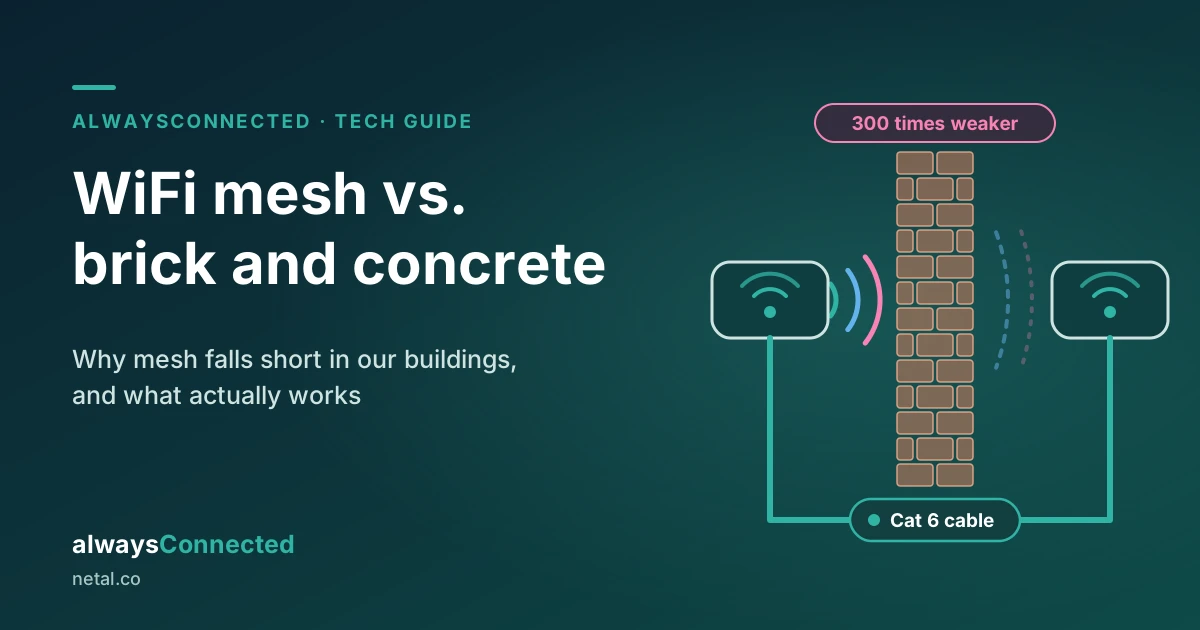
In a home, an office or a shop built with brick walls and concrete slabs, an off-the-shelf mesh WiFi kit rarely delivers what it promises. What works is running Cat 6 cable and, where that isn’t possible, using a mesh that links its units over 5 GHz, with more units than the box suggests.
We hear the same story on almost every visit. You bought a two- or three-unit kit because the box said “covers up to 5,000 sq ft”. Your apartment or office is about 1,300 sq ft (120 m²). Even so, in the back bedroom or the meeting room the video freezes and calls drop.
The equipment isn’t bad. It was designed and tested for a different kind of building. In this article we explain why, with numbers, and what we do instead.
Wall materials decide everything
Mesh kits are designed and tested with US homes in mind. There, 94% of new single-family homes completed in 2024 were wood-framed, with drywall interior walls (NAHB). Bogotá is the opposite: 98% of households live in buildings with brick or block walls, and the figure is the same in Chapinero (Bogotá Quality of Life Survey, SDP). Inside homes, offices and shops we see the same thing on our visits: brick partition walls and concrete slabs between floors.
A simple rule for reading the numbers below: every 3 dB lost halves the signal, 10 dB leaves a tenth of it and 20 dB leaves a hundredth.
- Drywall: costs about 3 dB at 2.4 GHz, 4 dB at 5 GHz and 5 dB at 6 GHz.
- Concrete block: costs 6 to 10 dB at 2.4 GHz, 10 to 20 dB at 5 GHz and 15 to 25 dB at 6 GHz (RF Essentials).
- Heavy concrete: in iBwave’s design tables it goes from about 23 dB at 2.4 GHz to about 45 dB at 5 GHz (iBwave).
- Concrete slab between floors: 15 to 25 dB, and that’s measured at 2.4 GHz only (Keenetic).
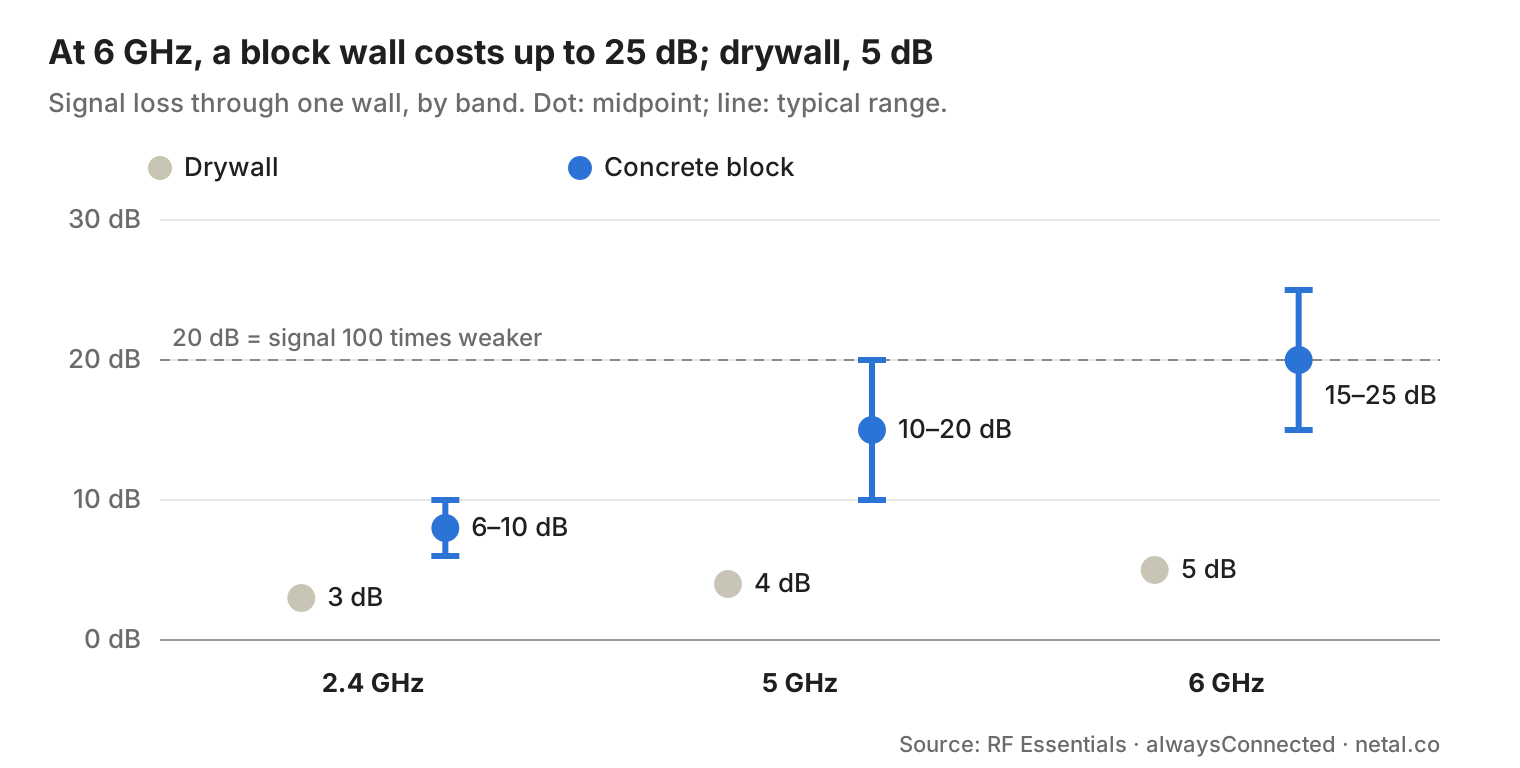
Do the math for a typical space. In a drywall building, a 5 GHz signal crosses three or four walls and loses about 15 dB. In a brick apartment or office, two walls at 5 GHz can cost 20 to 40 dB: the signal arrives 100 to 10,000 times weaker.
Mesh’s weak spot: the link between units
A mesh unit can only share the speed it receives. Each unit gets the internet from the main unit over WiFi; that link is called the backhaul. If the backhaul crosses brick and arrives weak, everything connected to that unit is slow, even if your phone shows full bars.
Two problems add up:
- The link between units fails first. With the walls from the previous section, the 5 GHz link degrades and the system ends up linking units over 2.4 GHz, which is slow and crowded with your neighbors’ networks.
- Every hop cuts the speed in half. In dual-band kits, the same 5 GHz radio serves your devices and talks to the other unit. Since it can’t transmit and receive at the same time, each relay leaves about half (Cisco Community). Enterprise network vendors recommend limiting hops for that reason (RUCKUS Community).
WiFi designers sum it up as an order of preference for connecting each access point: fiber, copper (Ethernet cable), a dedicated wireless bridge, single-hop mesh and, last of all, multi-hop mesh (WLAN Pros).
6 GHz and WiFi 7: faster in the same room, worse through brick
The 6 GHz band (WiFi 6E and WiFi 7) is the fastest and least crowded, but it’s the worst at getting through walls. A 2025 Cal Poly study measured different wall assemblies and found that 6 GHz loses on average 43.8% more signal than 5 GHz and 62.3% more than 2.4 GHz (Borges, Cal Poly).
In open air the difference is small: 6 GHz loses only 1 or 2 dB more than 5 GHz in the first meter, and in drywall offices it’s barely noticeable (Extreme Networks). The problem isn’t distance: it’s the walls. That’s why what works in a wood-and-drywall building doesn’t carry over to a brick one.
Then there’s transmit power. In Colombia, ANE Resolution 737 of 2022 opened the 6 GHz band for indoor, low-power use (MinTIC). In other words, the 6 GHz equipment in your home or office works under a low power cap, which doesn’t help make up for what each wall takes away.
The detail that worries us most: several high-end WiFi 7 mesh kits use 6 GHz for the link between units, alone or combined with 5 GHz. In a drywall building that works very well. In a brick-and-slab building, the 6 GHz link doesn’t get through, and the system depends on how it decides to fall back to 5 GHz.
Our conclusion: 6 GHz is excellent when the access point is in the same space as the devices using it. That’s an argument for more cabled access points, not for trusting a mesh that has to go through brick.
The best option: Cat 6 cable to every access point
With cable, the wall stops mattering. Each access point gets full speed over the cable and only has to cover the space it’s in. That lets you use 6 GHz in the living room, the study or the meeting room, because the equipment is right there.
Why Cat 6:
- It carries 1 Gbps up to 100 meters and leaves room for 2.5 Gbps, which many WiFi 7 devices already support.
- With PoE, the same cable carries data and power: the access point goes on the ceiling or the wall without an outlet next to it.
- It lasts for decades. The cable you install today will serve the next generations of equipment.
Running cable doesn’t mean breaking walls. In most apartments, offices and shops in Bogotá we use the existing conduits (for phone or TV) or the drop ceiling and, where there are none, a discreet surface raceway.
What we always check is that the data cable doesn’t share a conduit or raceway with electrical wiring. In a survey of an institutional building we found network cable in the same raceway as 110 V wiring, which degrades the signal and is a fire hazard.
If you want to see what a network like this looks like, here’s the network in our own home and what we do in networks for offices and businesses.
If you can’t run cable: mesh with a locked 5 GHz link and more units
Some homes, offices and shops have no conduits or don’t allow any work, so there’s no way to run cable. There a mesh does work, but not just any mesh, and not set up the way the box says. These are the conditions we require:
- Tri-band, with one 5 GHz band dedicated to the link between units. That way your devices don’t compete with the backhaul and the speed isn’t halved at each hop. Better still if that band is 4×4 (four antennas).
- The ability to lock the link to 5 GHz. Many systems pick the backhaul band on their own and, in WiFi 7 models, tend to prefer 6 GHz. You need to be able to force it to 5 GHz and, ideally, choose the channel. Few products do this reliably, and they’re the most expensive in each line.
- More units than the box suggests. The coverage manufacturers advertise is measured in light construction. In brick, we place each unit so there’s at most one brick wall between it and the main unit, and never a concrete slab.
- Connected to the main unit, as far as possible. Ideally each unit talks directly to the main one, in a single hop. That isn’t always possible: sometimes a unit has to connect through another one. In that case, the area covered by that second hop will get less speed and stability than the rest of the space, and we take that into account to place it where it’s needed least.
- Cable wherever possible. A mixed network is very common: one cabled unit upstairs and the rest on mesh. Every unit moved to cable takes load off the others.
If a unit ends up with a weak link, it’s best to move it or add another one: a poorly connected unit is worse than none, because it attracts devices and serves them slowly.
How we decide for your home or office
We don’t recommend cable or mesh without knowing the place first. On the survey visit we look at each space and how you use it, the type of walls and slabs, and the available conduits. We also check how the signal is reaching each area today and how many neighboring networks are around.
Then we give you a report and a quote with equipment and labor listed separately. The recommendation is almost always one of these three:
- Cat 6 cabling to each access point, where there are conduits or a raceway can be added.
- Mesh with a locked 5 GHz link, with the units where we place them, not where the box says.
- A mixed network, with cable where possible and mesh where not.
Our goal is the same as always: a robust, reliable, secure and versatile network that goes unnoticed, like any utility.
Is your home or apartment built with brick or concrete?
We do a site survey in north Bogotá. We measure the signal in every room, check the walls and conduits, and tell you whether cable, mesh or a mixed network makes sense. You get a quote that lists equipment and labor separately.
See home WiFi
Message us on WhatsApp
Is it for an office or business? See our networks for offices and businesses or how we work.
Frequently asked questions
So the mesh kit I already bought is useless?
Not if its units end up well connected to each other. Often it’s enough to move them, lock the link to 5 GHz if the equipment allows it, or cable one of the units.
What about a WiFi repeater or extender?
It’s the most extreme case of the hop problem: it uses the same radio to receive and to repeat, so it delivers about half of what it receives, and that’s if it receives it well.
Is it worth buying WiFi 7 for 6 GHz?
Yes, for the space where the access point is. To cover a whole home or office through brick, no: there, 5 GHz does the work.
Do you have to break walls to run cable?
Almost never. We use the existing conduits or a discreet raceway, and we make sure the result looks tidy.
How many units does my apartment or office need?
It depends on the walls and slabs, not the square footage. That’s why we assess it on the visit before quoting.
Sources
External sources cited in this article (accessed October 27, 2026):
- NAHB – Wood-framed home share increased in 2024
- SDP Bogotá – Housing characteristics, Quality of Life Survey 2007 (Spanish)
- RF Essentials – How 6 GHz propagation differs from 2.4 and 5 GHz
- iBwave – Attenuation across materials at 2.4 and 5 GHz
- Keenetic – WiFi signal attenuation through different materials
- Cisco Community – Wireless backhaul speed per hop
- RUCKUS Community – Maximum hops in a mesh
- WLAN Pros – The “Magic” of Wireless Mesh
- Borges (2025), Effect of Wall Assemblies on Wi-Fi 6E Signal Strength, Cal Poly
- Extreme Networks – How Far Will Wi-Fi 6E Travel in 6 GHz?
- MinTIC – Opening of the 6 GHz band, ANE Resolution 737 of 2022 (Spanish)
Book your site survey
Is your WiFi not reaching every room?
Book a site survey: we measure your network and send you a written proposal.
Or, if you prefer, we can contact you:
Leave your details and we will email or call you within the same business day.
