
Secure home WiFi: VLANs, VPN, captive portal and remote management in my own house
Why I’m showing you my own network
What does a secure home WiFi network look like? The best proof of what we install at alwaysConnected is the network in my own house. I use it every day for work, for my family and for visitors. In this post I explain how it’s built and why each piece is there.
I start from a simple idea: like water or electricity, a good network should go unnoticed. Nobody should have to think about the WiFi, except for the peace of mind of knowing it’s robust, reliable, secure and versatile.In this post:
- A secure home WiFi network at a glance
- One network for each job: VLANs
- A captive portal for the students who visit
- Two VPNs, two different jobs
- Two filters against dangerous pages
- Remote management: fixing things without a visit
- The equipment: why not an off-the-shelf kit
- What could work in your home or business?
- Frequently asked questions
A secure home WiFi network at a glance
Work, family, TVs, a number of smart devices and visitors all share my home. Each needs something different from the network, and this is the design that handles it.
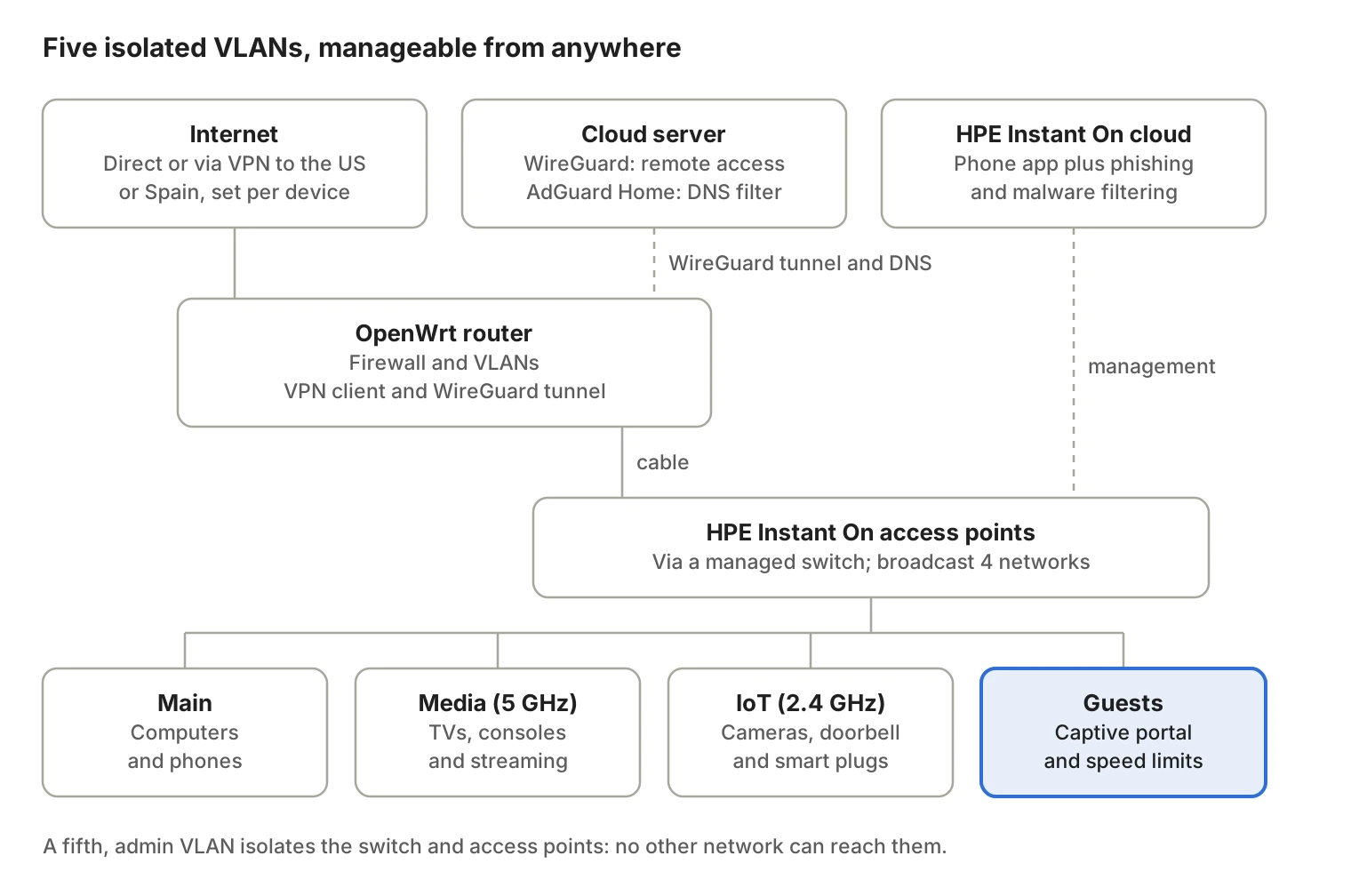
The router decides what goes out through the VPN and what doesn’t. The access points broadcast the four WiFi networks, and the two cloud services at the top let me manage everything without being at home.
One network for each job: VLANs
My home doesn’t have a single network. It has five, and each one lives in its own VLAN (a virtual network isolated from the others). Four are WiFi networks; the fifth is the admin network for the infrastructure. That way, a problem on one device doesn’t spread to the rest of the house.
| Network | What it’s for | What it can reach |
|---|---|---|
| Main | The family’s computers and phones | Internet, printers and the media network |
| Media (5 GHz) | TVs, consoles and streaming | Internet; nothing on the main network |
| IoT (2.4 GHz) | Smart plugs, cameras, doorbell and home automation | Internet only |
| Guests | Visitors, through a captive portal | Internet only, with a speed limit |
| Admin (no WiFi) | The managed switch and the HPE access points | Only I can manage it |
The IoT network is the one most worth separating. Those cheap gadgets rarely get updates, and if one is compromised it has no way to reach my laptop or my work files.
The admin network is the least visible and the most protective. None of the other four networks can reach the switch or the access points, so neither a curious guest nor a compromised device can change the network’s settings.
A captive portal for the students who visit
Students come to my house regularly for design classes. We used to read the WiFi password out to each of them, and that password ended up everywhere.
Now they join the guest network and see a welcome page, like in a hotel or an airport. They accept the terms of use, get registered and start browsing. What we gain:
- No password is shared for the family network.
- Guests stay isolated in their own VLAN: they can’t see the computers, the TV or the cameras.
- Speed is capped per person, so one big download doesn’t leave everyone else offline.
- I know who connected and when, which helps if something goes wrong.
This portal is our own development and works with HPE Networking Instant On (formerly Aruba Instant On) access points. It’s the same guest WiFi captive portal we offer to residential buildings, clubs and businesses that welcome visitors.
Two VPNs, two different jobs
I use WireGuard, a modern, fast and lightweight VPN protocol, for two different things.
1. Browsing as if I were in the United States or Spain. The router runs a commercial VPN with exit points in other countries. To the sites I visit, my connection appears to be in Madrid or Miami, not Bogotá. This does two things:
- Privacy from the internet provider. Traffic travels encrypted, so the provider can’t see which pages I visit or what I stream. It only sees an encrypted connection.
- Access to geo-blocked sites. Many portals only respond to connections from their own country: Spanish government e-services (taxes, social security, traffic), some US government services, foreign banks and brokers, online stores, airlines and local newspapers that restrict access from Colombia.
The key is that not everything goes through the VPN. With policy-based routing I decide which devices or destinations exit through the US, which through Spain and which go direct, which is fastest. Colombian banks, video calls and online games stay on the normal path.
2. A private tunnel into my network from anywhere. I run my own WireGuard server in the cloud, in a data center in Bogotá. The home routers stay connected to it at all times. That way I can reach my network from my phone or laptop wherever I am, without opening ports on the home router to the whole internet.
Two filters against dangerous pages
Before a device in the house opens a page, the network checks whether it’s safe. It does so with two independent layers, and if one fails, the other keeps protecting.
1. Content policies on the HPE equipment. The HPE Instant On access points block known phishing and malware sites. If someone clicks a fake link that arrived by email or WhatsApp, the page doesn’t load. This protects everyone who connects, including guests and IoT devices, which have no antivirus.
2. AdGuard Home in the cloud. Every DNS lookup in the house (the “address book” that turns bank.com into an internet address) goes through my own AdGuard Home server in the cloud. It blocks malicious domains, ads and trackers before they reach any device.
AdGuard also adds privacy. Because the house doesn’t use the internet provider’s DNS or any third party’s, nobody builds a history of the pages the household looks up, and the provider can’t redirect or alter those lookups.
Remote management: fixing things without a visit
The network is managed remotely in two ways, and that changes everything when something fails.
- The HPE Instant On access points are managed from a cloud app. From my phone I can see what’s connected, how much each device uses, change a password or restart an access point.
- The routers I manage through the WireGuard tunnel. I can review settings, apply changes or troubleshoot an outage without being at home.
This is exactly what we do for alwaysConnected clients: most adjustments are solved remotely, in minutes, without scheduling a visit.
The equipment: why not an off-the-shelf kit
The mesh kits sold in stores (Deco, Eero, Velop and the like) work fine for the basics. But almost none of them let you split networks into VLANs, run your own VPN or control in detail who gets in and how traffic leaves.
That’s why my network uses:
- OpenWrt routers, an open system that supports VPNs, policy-based routing and custom firewall rules.
- HPE Networking Instant On access points, business-grade equipment that handles several networks at once and is managed from the cloud.
- Cabling to the access points, so the WiFi is spread from several points instead of bouncing between them.
Not every home needs all of this. What matters is that the network is designed around the people who use it, not the other way around.
What could work in your home or business?
All of this can be brought to another home, a small office or a business that welcomes customers. But we only bring what you need, and we try to reuse the equipment you already have:
- If you have cameras, a doorbell or smart devices: a separate IoT network.
- If you receive visitors, students or customers: a guest network with a captive portal.
- If you work from home: a protected main network and, if you need it, a VPN.
- If there are children or people who click links without a second thought: phishing, malware and ad filters for the whole network.
- If you don’t want to wait for a visit for every adjustment: remote management.
It all starts with a site survey: we measure the signal room by room, look at the equipment you have and propose only what you need.
Frequently asked questions
What is a VLAN and why use one at home?
It’s an isolated virtual network inside the same installation. It keeps guests, smart devices and family computers apart, so a problem on one doesn’t reach the others.
What is a captive portal?
It’s the welcome page that appears when you join the guest network, like in a hotel. It avoids sharing the password, records who connects and lets you cap their speed.
Do I need a special router for VLANs and VPN?
Most internet-provider routers can’t do it. We use an OpenWrt router or equipment like HPE Networking Instant On, and reuse what you already have whenever possible.
Can the network be managed without a home visit?
Yes. The access points are managed from a cloud app and the routers through a VPN tunnel, so most adjustments are done remotely.
alwaysConnected: robust, reliable, secure, versatile.
Book your site survey
Is your WiFi not reaching every room?
Book a site survey: we measure your network and send you a written proposal.
Or, if you prefer, we can contact you:
Leave your details and we will email or call you within the same business day.